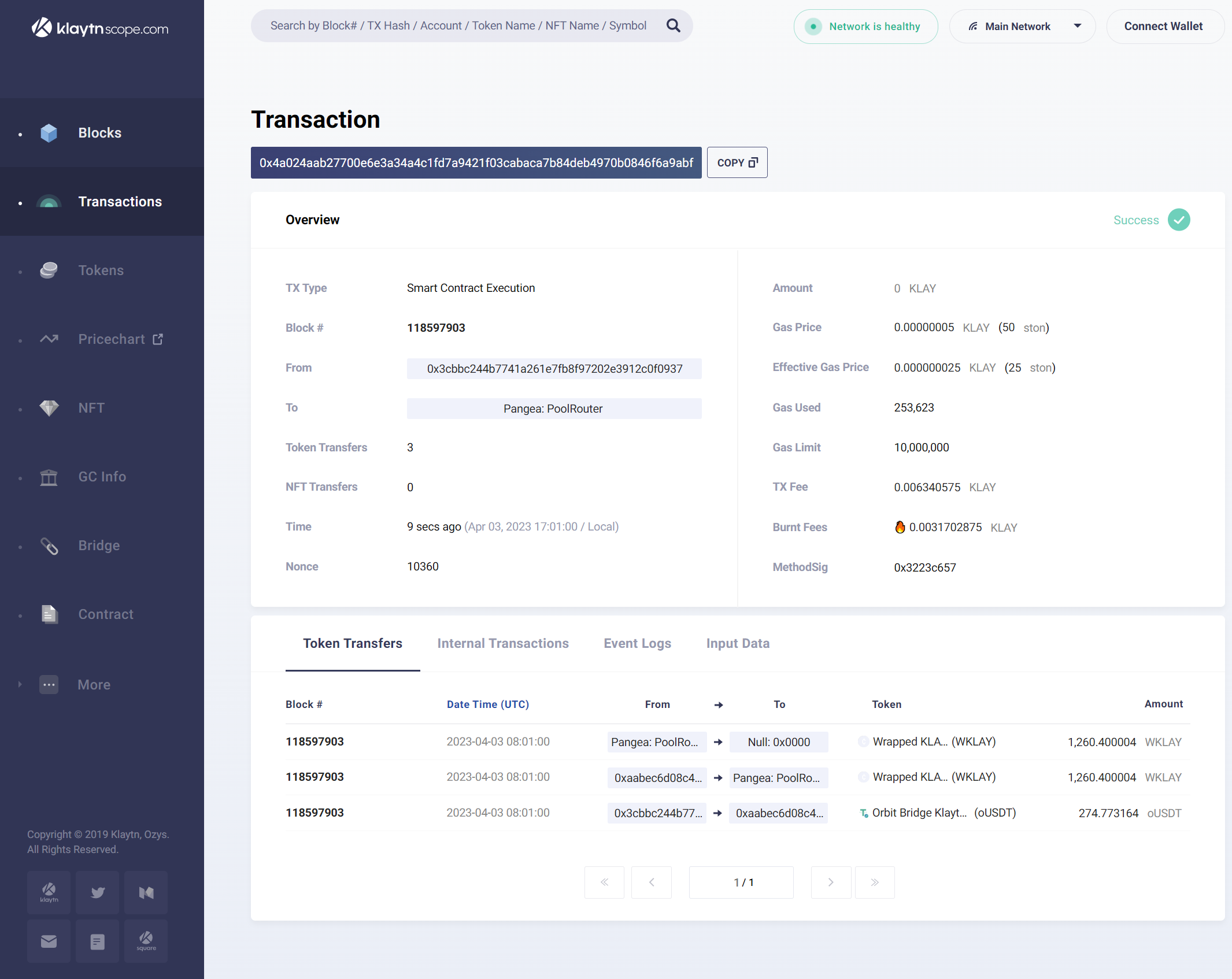
# Transactions Overview
## Overview
List of transactions in a block. It provides general information about each transaction.
***
#### **Status indicator**
Indicates whether the transaction was successful or not. It is located at the top right side of the Overview section. Refer to Klaytn Docs for details on the status displayed.
#### **TX Type**
Type of transaction.
#### **Block**
The number of the block in which the transaction was executed. Clicking on the block number for block details.
#### **From**
The transaction sender's address. Click the address for Account or Contract details.
#### **To**
The transaction recipient's address. Click the address for Account or Contract details.
#### **Token Transfers**
Displays the number of token transfers.
#### **NFT Transfers**
Displays the number of NFT transfers.
#### **Fee Payer**
Displayed if the transaction fee is fully or partially delegated. Click the “Fee Payer address” for account details.
#### **Time**
Time since the transaction was executed.
#### **Nonce**
The number of transactions sent from the sender's address. Starting from 0, it increases by 1 sequentially each time a transaction is executed.
#### **Amount**
The amount of KLAY transferred through the transaction. It displays the estimated KLAY price atthe time the transaction was executed.
#### **Gas Price**
The price of KLAY per gas. Generally, this value is fixed on Klaytn Network. Depending on blockchain network congestion, the price may be adjusted.
#### **Effective Gas Price**
The actual gas fee that was used in the transaction. It is equivalent to the Base Fee. In a block, all transactions are calculated using the same Base Fee.
#### **Gas Used**
The amount of gas used to execute the transaction.
#### **Gas Limit**
The maximum amount of gas the transaction sender is willing to pay.
#### **TX Fee**
The fee incurred in processing the transaction. The “TX Fee” is calculated by multiplying the “Gas Price” by the “Gas Used.”
#### **Burnt Fees**
Fee automatically burnt from transaction costs. The burn rate is 50%.
#### **Method/MethodSig**
The function identified in the input data. This is the function identified in the input data of a transaction. The method name is displayed if it is a recognizable or well-known function. In the case of unidentified functions, the method signature is displayed.